Not sure what to actually build with the Flow Builder? Start here. Everything below is a real, working shape — grouped by what it's for, roughly simple-to-complex within each group. See Flows and Flow Builder if you haven't read the basics yet, and Events, Nodes, and Commands for the full reference behind everything mentioned here.
¶ Contents
- 🤖 Replace a bot: fully built examples
- 💬 Chat commands
- 👋 Follows, subs & cheers
- 🎁 Redeems & moderation
- 📣 Raids, shoutouts & milestones
- 🪙 Points & economy
- 🎨 Custom-built alerts
- ⏱️ Cooldowns & repeat logic
- 💙 Discord servers
- 🎬 OBS and your stream
- 🔁 Cross-platform & scheduled
¶ 🤖 Replace a bot: fully built examples
Plenty of communities run a separate bot for one or two small jobs. Each example below is a complete Flow, shown exactly as it looks in the Flow Builder, for a job that bots like MEE6, Dyno, Carl-bot, Nightbot or StreamElements are commonly used for. Every example starts with why people build it, then the picture, then how it works and what to watch out for. They cover that one job, not a bot's whole feature set (dashboards, levels, music and so on).
Two things hold for all of them:
- A Flow's trigger settings (for example "Message Content starts with !title") are set on the Flow itself and aren't part of the picture.
- For Discord, the server and channel come from a list in the node. A message ID, role ID or user ID is the long number Discord gives every message, role and person. To get one, switch on Developer Mode in Discord (Settings → Advanced), then right-click the message, role or person and choose Copy ID.
¶ 👋 A welcome message for new Discord members
Why people build it: a friendly greeting is the first thing a new member sees, and it's the most common reason a community adds a bot at all. Many servers also hand new members a starter role at the same moment, for example one that unlocks the chat channels.
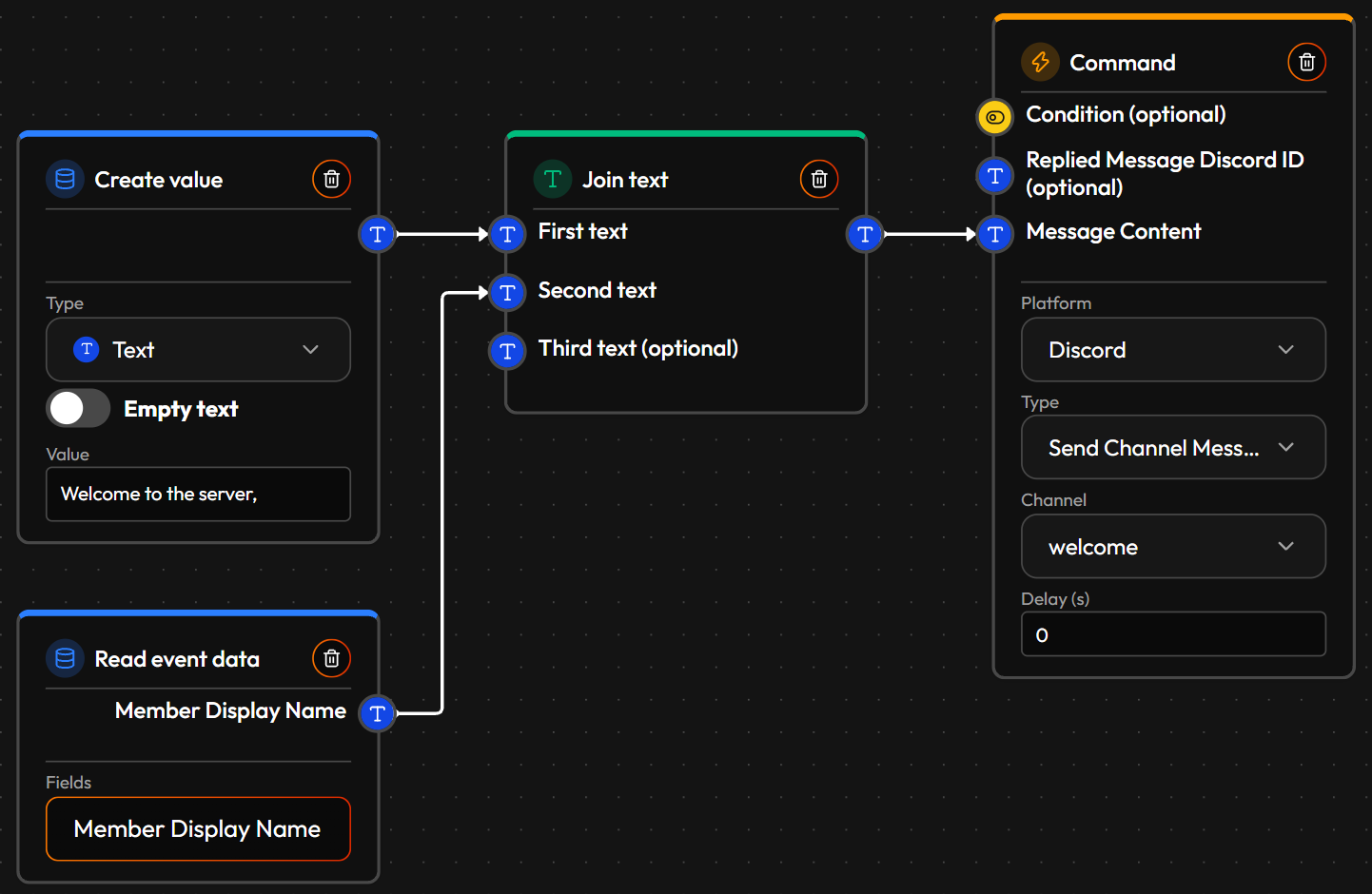
How it's built: the event is Discord Member Joined. Create value (Text) holds "Welcome to the server, " and Read event data reads the new member's Member Display Name. Join text glues the two together, first then second. It gets a new input each time you connect one, so a single Join text can put up to 10 pieces together. Send Channel Message posts the result in the welcome channel you picked. The space at the end of the Create value text is deliberate: without it the name would stick to the last word.
Add an automatic role: add Add Role to Member to the same Flow. It needs three things: your server (picked from the list), who gets the role (the member's ID, which Read event data provides as Member Discord ID) and which role (its ID, typed into a Create value node). The bot needs Manage Roles, and its own role has to sit above the role it hands out in your server's role list, otherwise Discord refuses.
¶ ✅ Reaction roles
Why people build it: members pick their own roles (a pronoun role, a game role, "notify me about streams") by reacting to a message with an emoji, so moderators don't hand them out by hand. The classic setup is a rules message that gives access to the rest of the server once someone reacts with a checkmark.
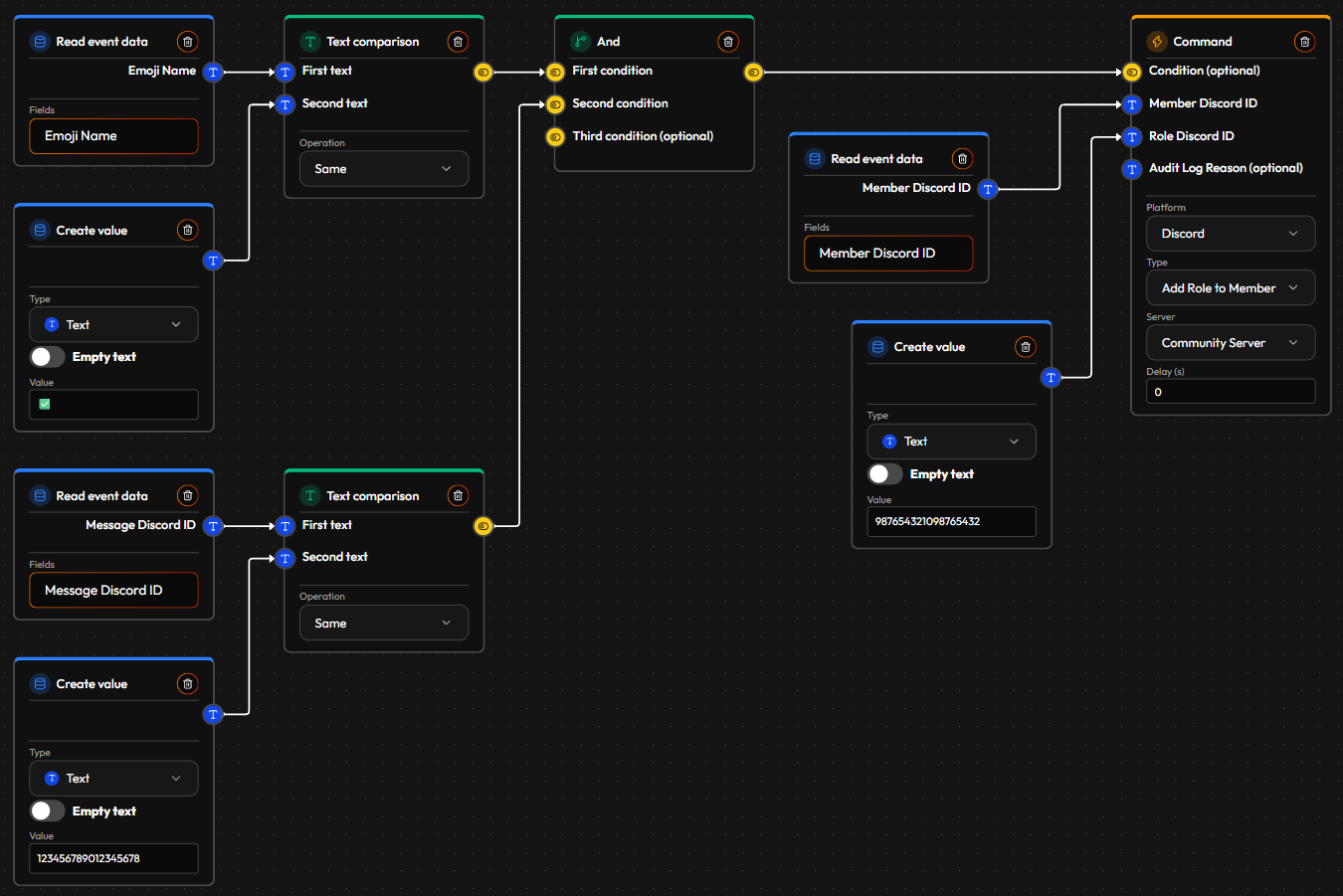
How it's built: the event fires for every reaction on every message in your server, so the Flow first checks that this is the reaction it cares about. One Text comparison (Operation: Same) compares the reaction's Emoji Name with the emoji you chose. A second compares the reaction's Message Discord ID with the ID of your rules message. And only lets the Flow continue if both are true, and that result goes into Add Role to Member's Condition. The role goes to the person who reacted (Member Discord ID from Read event data), and the role's ID sits in a Create value node. The IDs in the picture are placeholders: paste in your own.
One Flow handles one emoji on one message; copy it for every extra role. To take the role away again when someone removes their reaction, use Discord Reaction Removed and Remove Role from Member. The bot needs Manage Roles and a role above the one it gives out.
¶ 🗑️ A log of deleted messages
Why people build it: moderators want to notice when something disappears, for example when someone posts something rude and deletes it before anyone reacts. A private mod-log channel keeps a trail without anyone watching every channel.
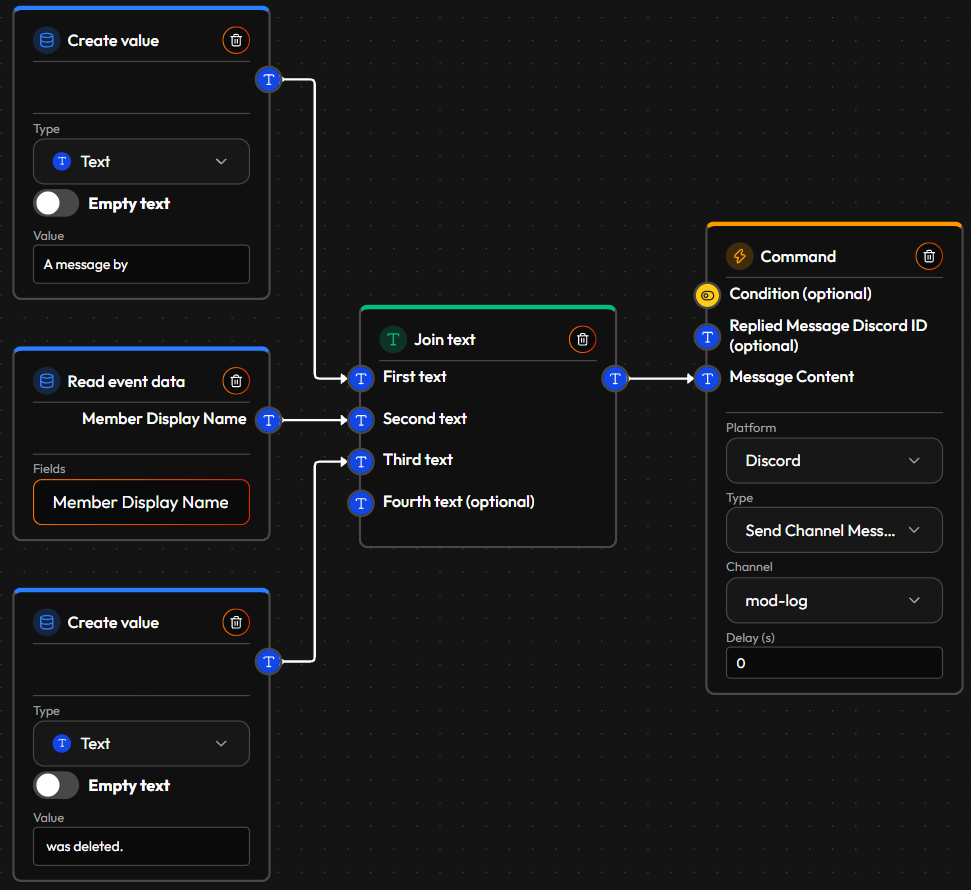
How it's built: the event is Discord Message Deleted. One Join text puts three pieces in order: "A message by ", the author's name (Member Display Name) and " was deleted." from a second Create value. Send Channel Message posts the sentence to your private mod-log channel.
Two limits: the event doesn't carry the text of the deleted message, so the log says who and not what. And the author is best-effort: for a message the bot hasn't seen recently, the name can read "Unknown user".
¶ 📢 A "we're live" post in Discord
Why people build it: streamers want their Discord community to know the moment the stream starts, without posting by hand every time. It is one of the most common jobs of "now live" bots.
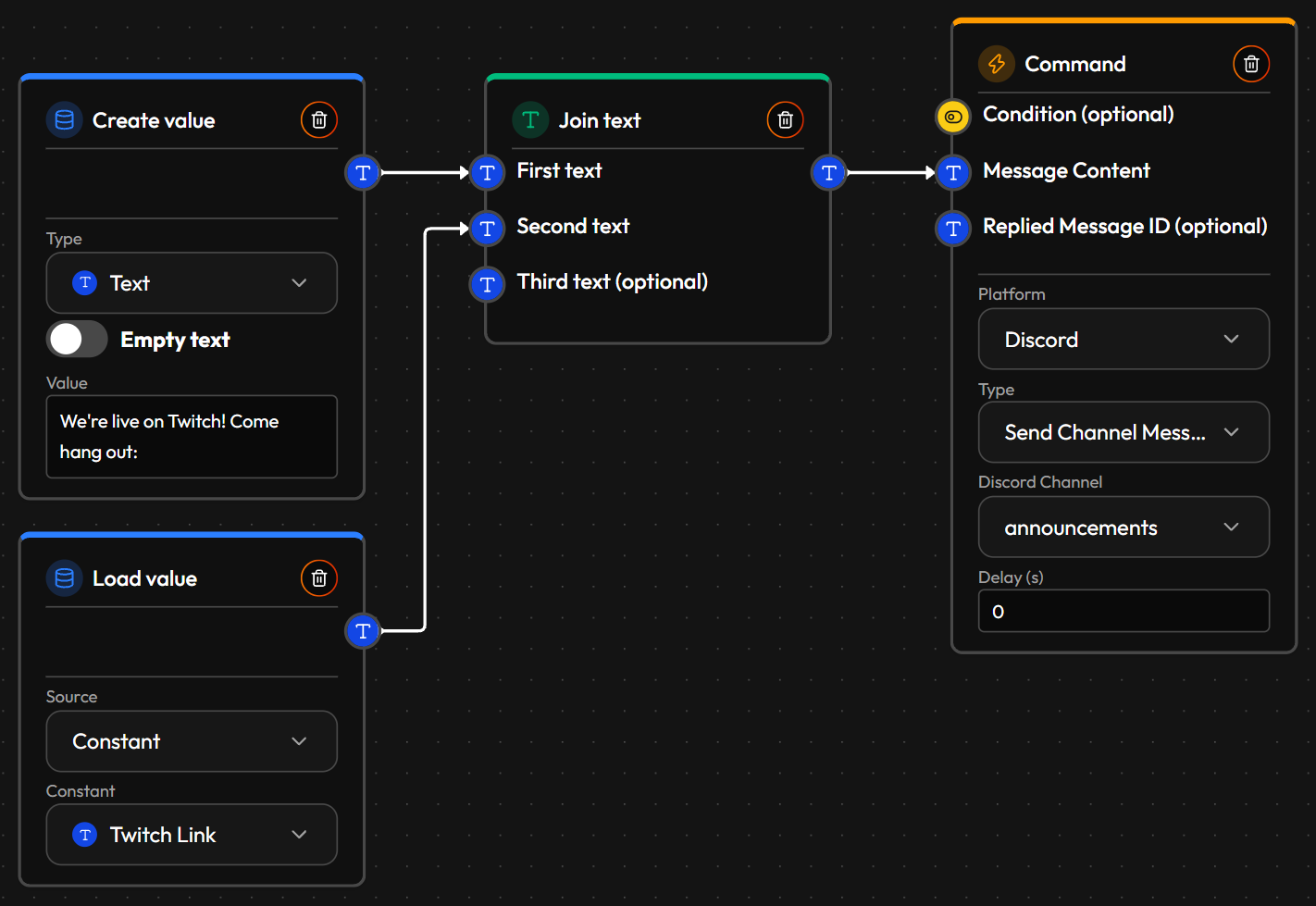
How it's built: the event is Twitch Stream Start, but the action is a Discord one, so a single Flow connects both platforms. Create value holds "We're live on Twitch! Come hang out: ". Load value (Source: Constant) reads your channel link from a Constant, so when the link changes you edit it in one place instead of in every Flow. Join text glues the two together and Send Channel Message posts it to the announcements channel you picked. Only the owner of a Discord server can build Flows for it (see Account).
To announce the stream title or game too, read them from the event and add them to the Join text.
¶ 🛠️ A "!title" command for your moderators
Why people build it: moderators can change the stream title from chat while the streamer is busy playing, so nobody has to alt-tab to the Twitch dashboard. Chat bots such as Nightbot have long offered this.
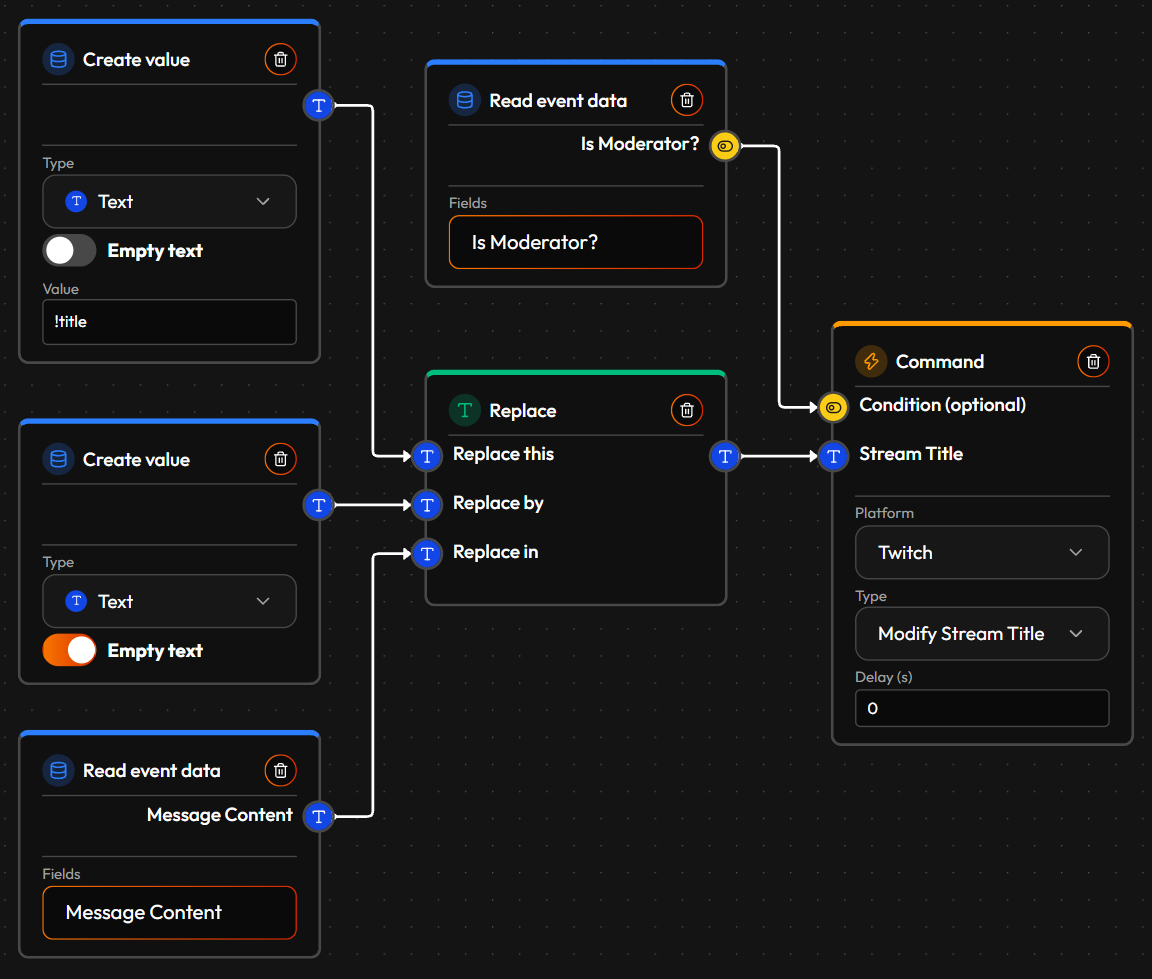
How it's built: the event is Twitch Chat Message, where Message Content starts with "!title ". A chat message arrives as one piece of text, so "!title Playing something new" contains the command word as well as the new title. Replace removes "!title " from Message Content (Replace this: "!title ", Replace by: nothing, in Message Content), so only "Playing something new" is left to become the title. "Replace by: nothing" is a Create value node with its Empty text switch turned on, because an empty value has to be asked for explicitly. Modify Stream Title takes that text as the new title.
Who may use it: Read event data (Is Moderator?) is wired into the action's Condition, so the action only runs when the message came from a moderator. A regular viewer typing the command does nothing. Publishing asks you to grant the Twitch permission for changing the stream title, if you haven't yet.
¶ ⏳ A "!followage" command
Why people build it: viewers love to see how long they have been following, and a "!followage" answer is one of the most-used commands in Nightbot and StreamElements setups.
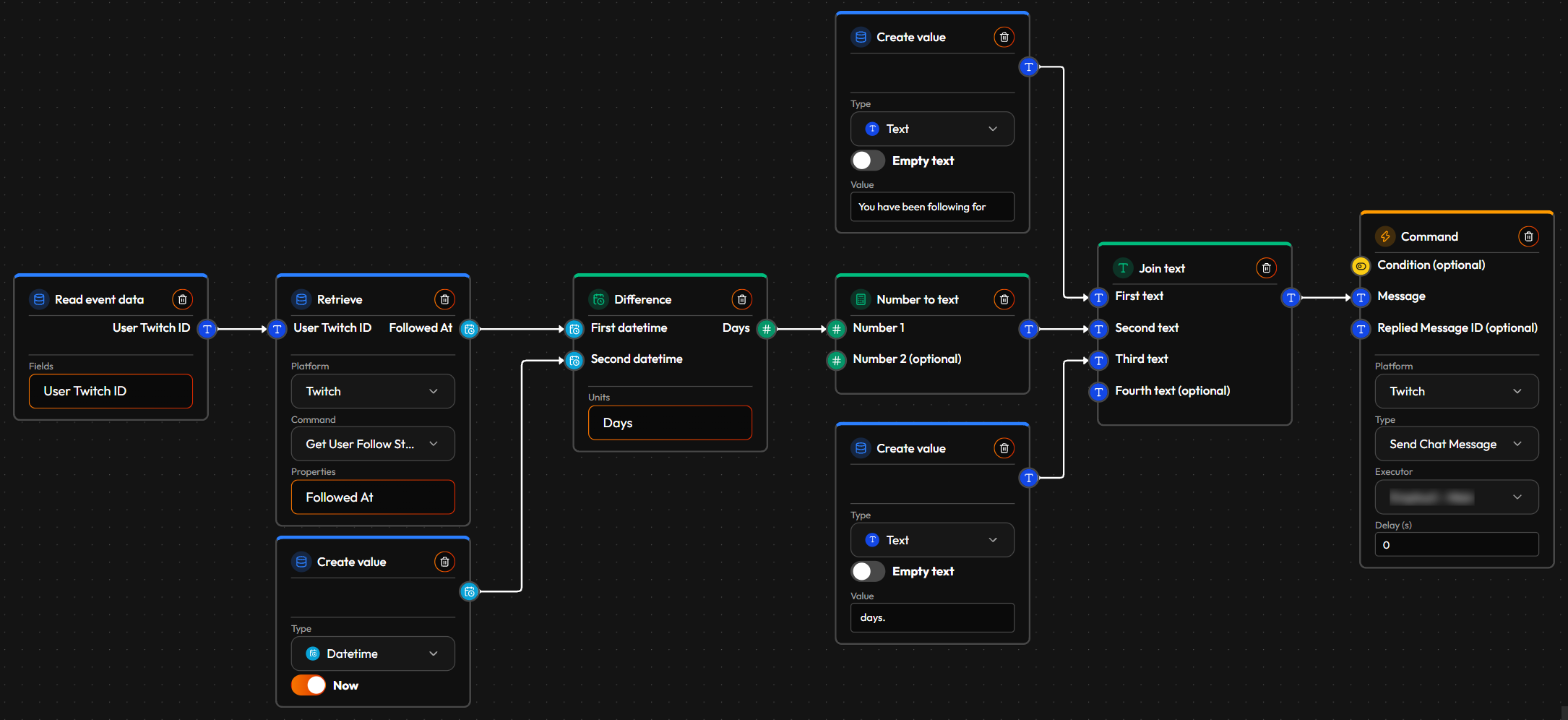
How it's built: the event is Twitch Chat Message, where Message Content starts with "!followage". The chat message doesn't say when someone started following, so the Flow asks Twitch: Read event data gives the chatter's ID (Viewer Twitch ID) and Retrieve (Get User Follow Status, property Followed At) looks up the date they followed. A Create value node in Datetime with Now switched on provides the current moment. Difference measures the time between the follow date and now, in the unit you pick (Days here). Number to text turns that number into text so it can be joined into a sentence, and one Join text puts "You have been following for " in front and " days." at the end. Send Chat Message posts the sentence.
This only works for viewers who follow you: someone who doesn't follow has no follow date, so there is nothing to measure. Change the unit to Months or Years for a long-running channel.
¶ 🔊 A sound alert for special moments
Why people build it: a sound alone can be funnier or scarier than any picture: a jump-scare scream when a viewer redeems "Scare the streamer", a silly voice clip for a small Bits donation, or a big fanfare only for large cheers. Alert-box tools such as Streamlabs and StreamElements are commonly used for this. Because it is a Flow, you can pick exactly which moments trigger it.
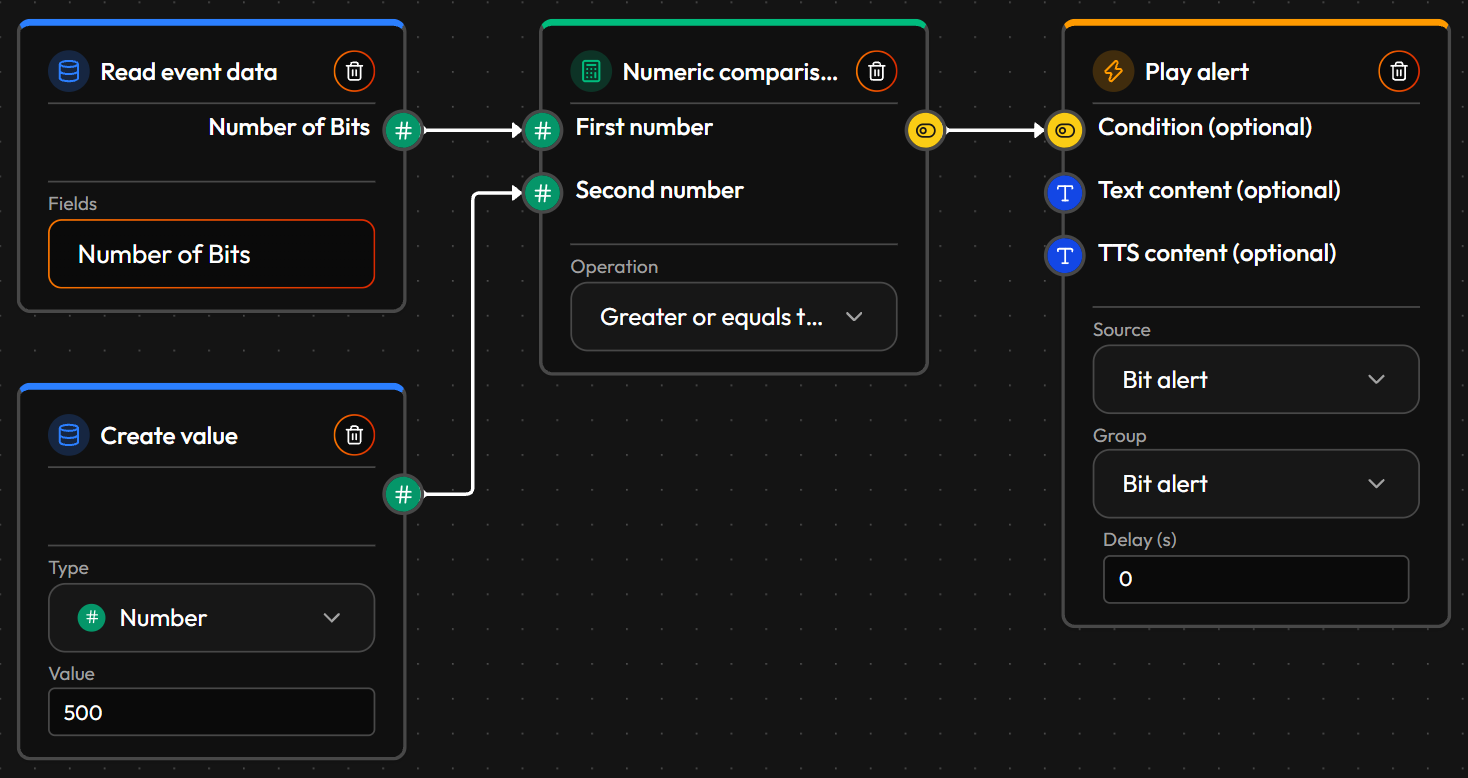
How it's built: the event is Twitch Cheer. Read event data reads Bits Used, and Numeric comparison (Operation: Greater or equals than) compares it with 500, which sits in a Create value node of type Number. The comparison's result goes into Play alert's Condition, so the alert plays only for cheers of 500 Bits or more. Play alert has an empty Text content and TTS content, so nothing is shown or read out: the Source and Group you pick decide what plays, and a Group set up with only a sound gives you a sound-only alert (see Alerts). The Source and Group names in the picture are just what the test account has: pick your own.
Same idea with channel points: use the event Twitch Custom Channel Point Reward Redeemed, where Reward Name equals your reward (for example "Scare the streamer"), and connect nothing but Play alert. For a funny voice instead of a clip, fill in TTS content and choose a Group with the voice you like.
¶ 💬 Chat commands
-
🗨️ Answer your own command word: reply automatically whenever someone types a command you choose.
Event: Twitch Chat Message, where Message Content starts with "!socials". Action: Send Chat Message, with your social links. -
🔗 One invite link, updated everywhere: change your Discord invite once, not inside every Flow that mentions it.
Event: Twitch Chat Message, where Message Content starts with "!discord". Nodes: Load value (Source: Constant — aDiscord InviteConstant you set up once). Action: Send Chat Message, with the Constant's value. See Constants & Macros. -
🛡️ A one-word Shield Mode switch, mods only: flip on Shield Mode the instant chat needs it, without leaving Twitch.
Event: Twitch Chat Message, where Message Content starts with "!shield". Nodes: Read event data (Is Moderator?), wired straight into the Condition. Action: Activate/Deactivate Shield Mode, switched on — gated on the badge check, so only a moderator's message actually triggers it. -
📢 A typed shoutout command, mods only: shout out anyone by name on demand, without digging through your follower list or risking a random viewer spamming it.
Event: Twitch Chat Message, where Message Content starts with "!so". Nodes: Read event data (Is Moderator?) → Retrieve (Get User By Name, using Parameter 1 as the username; "!so @name" works too, the @ is dropped for you). Action: Create Shoutout, targeting the ID the Retrieve step found — gated on the moderator check. -
🎱 A magic 8-ball command: give chat a fun random answer to whatever they ask.
Event: Twitch Chat Message, where Message Content starts with "!8ball". Nodes: Replace (Replace this: "!8ball", Replace by: nothing, Replace in: Message Content — leaves just their question) → Random (1 to 3) → Switch (three Create value nodes, each holding a different canned answer). Action: Send Chat Message, combining their question with whichever answer got picked.
¶ 👋 Follows, subs & cheers
-
👋 Follower welcome: greet new followers by name, automatically — the first Flow most people build (see Getting Started).
Event: Twitch Follow. Action: Send Chat Message, mentioning the new follower by name. -
⭐ New subscriber shoutout / 🔁 Resub thank-you: acknowledge both moments differently.
Event: Twitch Subscription Paid → Send Chat Message. Event: Twitch Subscription Shared in Chat → Send Chat Announcement, thanking them for their Cumulative Months. -
💌 Only send a named thank-you when there's a name to use: skip the awkward blank where a name should be.
Event: Twitch Cheer. Nodes: Not (flips the event's Is Anonymous? field). Action: Send Chat Message, thanking the cheerer by name — gated on the Not node's result. -
🏆 Shout out this stream's top cheerer: recognize whoever's leading the Bits leaderboard, on demand.
Event: Twitch Chat Message, where Message Content starts with "!topcheer". Nodes: Retrieve (Get Bits Leaderboard). Action: Send Chat Message, built from the result.
¶ 🎁 Redeems & moderation
-
🚪 A different reaction for followers vs. new viewers: same redeem, a warmer response for people who already follow you.
Event: Twitch Custom Channel Point Reward Redeemed. Nodes: Retrieve (Get User Follow Status, on whoever redeemed it). Action: two Send Chat Message actions gated on the same check — one extra-warm reply for followers, a normal one otherwise. -
👑 VIP on redeem: let viewers claim VIP with their own channel points.
Event: Twitch Custom Channel Point Reward Redeemed, Reward Name equals "VIP". Action: Add VIP. -
😂 Fun timeout redeem: a silly redeem for content — self-inflicted, or turn it on a friend.
Event: Twitch Custom Channel Point Reward Redeemed, Reward Name equals "Timeout me". Action: Timeout Viewer, on the person who redeemed it. Want redeemers to name a target instead? Ask for a name in the reward's prompt, then Nodes: Retrieve (Get User By Name, using Viewer Comment as the username) → Action: Timeout Viewer, on the ID the Retrieve step found.
¶ 📣 Raids, shoutouts & milestones
-
📣 Raid welcome: shout out anyone who raids you, automatically.
Event: Twitch Incoming Raid. Action: Create Shoutout, for the raider. -
🔄 Reciprocal shoutout: return the favor the moment someone shouts you out.
Event: Twitch Shoutout Received. Action: Create Shoutout, back to them. -
🚀 Announce a Hype Train level-up: play an alert the moment the level actually changes, not on every Progress tick Twitch fires while the meter fills.
Event: Twitch Hype Train Progress. Nodes: Load value (last saved level) → Numeric comparison (equals the event's Level?) → Not. Action: Play alert announcing the new level, plus a Save value updating the stored level for next time — both gated on the Not node's result. -
🏆 Thank the Hype Train's top contributors: name who carried it, once it's over.
Event: Twitch Hype Train End. Nodes: Read event data (Top Bits Contributor Twitch Name, Top Subscription Contributor Twitch Name) → Join text (a thank-you around both names). Action: Send Chat Announcement. A train without Bits (or without subs) reads "null" for that name; a Text comparison against "null" can pick a shorter message instead. -
🔥 A bigger shout for a bigger streak: play a real alert for milestone-worthy watch streaks, and a quiet chat thank-you for the smaller, more frequent ones.
Event: Twitch Watch Streak Shared. Nodes: Numeric comparison (Watch Streak Count at or above a milestone you pick, e.g. 50). Action: two actions gated on the same check, opposite ways — Play alert for the big ones, Send Chat Message with a plain thank-you otherwise. -
🎯 Goal achieved announcement: celebrate only real wins, not just whenever a goal ends.
Event: Twitch Goal End. Nodes: the event's own Was Goal Achieved? field, wired straight into the Condition. Action: Send Chat Announcement. -
📢 A heads-up chat message when an ad break starts: let viewers know what's happening and ask for a little patience, instead of them wondering why the video just changed.
Event: Ad Break Begin. Nodes: Read event data (Ad Duration (seconds)) → Number to text → Join text (builds a sentence around it). Action: Send Chat Message, e.g. "Dear Chat, we're having a short, {duration} seconds ad break. Thank you for your patience!" Want to only announce the longer breaks? Add a Numeric comparison gate on Ad Duration (seconds) first.
¶ 🪙 Points & economy
See Collectables for the full picture — these are a few concrete ways to put a custom currency to work.
-
🪄 Turn Bits into points, 1-for-1: no math needed, just a direct wire.
Event: Twitch Cheer. Nodes: Read event data (Bits Used), wired straight into the amount to give. Action: Add collectable, Amount wired directly to Bits Used and User ID to the cheerer's Viewer Twitch ID. -
🎲 Sub roulette: turn an ordinary sub into an occasional surprise.
Event: Twitch Subscription Paid or Twitch Subscription Shared in Chat. Nodes: Random (1 to 100) → Numeric comparison (at or below 10 — a 1-in-10 chance). Action: if it lands, a bonus Add collectable for the subscriber (their Viewer Twitch ID into User ID) plus a special Play alert. -
🔍 Check anyone's balance: "!points" shows your own, "!points @name" shows someone else's.
Event: Twitch Chat Message, where Message Content starts with "!points". Nodes: Read event data (Parameter 1) → Text comparison (Same as "null", meaning no name was typed) → Not; Retrieve (Get User By Name, Parameter 1 as the username) finds the named person's ID; a Switch picks that ID when a name was typed, otherwise the chatter's own Viewer Twitch ID → Collectable (Scope: User, the picked ID as User ID) → Number to text → Join text. Action: Send Chat Message with the result. For a mistyped name, use the lookup's Viewer Exists?: an Or of "no name typed" and Viewer Exists? goes into this action's Condition (optional), and a Not of that Or into a second Send Chat Message that says nobody is called that.
¶ 🎨 Custom-built alerts
-
✨ An auto-built, highlighted cheer alert: a fully custom, styled alert instead of one fixed line.
Event: Twitch Cheer. Nodes: Number to text (Bits Used) → Join text (builds a sentence) → Apply highlight (wraps the number in a saved style). Action: Play alert, with the assembled, styled text as its on-screen text.Apply highlight's formatting only shows up on the Alert overlay — sent to a chat message instead, chat can't render it, so the raw styling code shows up wrapped around the plain text instead.
-
🪄 A spendable "mana" system for chat-triggered alerts: pair a Collectable with a chat command so viewers can trigger their own alert on screen — pipe Bits into it 1-for-1 (see above) and it becomes a proper spell economy.
Event: Twitch Chat Message, where Message Content starts with "!fireball" (or whichever spell name you like). Nodes: Read event data (Viewer Twitch ID) → Collectable (balance check, Scope: User, Filter type: Active, that ID as User ID) → Numeric comparison (enough Mana to cast?). Action: two actions gated on the same check — Spend collectable (the same User ID), and Play alert with a matching video/sound. Add a few more commands, each spending a different amount for a different effect, and you've got a whole spellbook.
Play alert fires the instant its Flow completes, so even a jump-scare-style effect lands exactly on cue — handy for anything (a cheer, a redeem, a command like this one) where timing is the whole point.
¶ ⏱️ Cooldowns & repeat logic
-
⏱️ A cooldown for a fun chat command: stop it from being spammed.
Event: Twitch Chat Message, where Message Content starts with "!hug". Nodes: Load value (last used time) → Create value (Datetime, "Now") → Difference (seconds since) → Numeric comparison (long enough yet?). Action: Send Chat Message, followed by a Save value recording this moment as the new "last used" time. -
🧱 The same cooldown, reused everywhere: several command Flows all needing that exact check, fixed in one place instead of rebuilt in each.
Nodes: the cooldown check above, saved once as a Macro and dropped into every command Flow that needs it, instead of rebuilding those four nodes each time. See Constants & Macros. -
🔌 One flip to pause every command Flow: go into maintenance mode without unpublishing a dozen Flows one by one.
Constant: a Bool Constant (e.g.Maintenance Mode) you flip to true when you need quiet. Nodes: Load value (Source: Constant) → Not, wired into every Command's Condition (optional). Effect: flip the Constant once, and every Flow using it stops firing — flip it back and they're all live again, instantly. -
🤫 A timer that skips its turn when chat's been quiet: check in on a schedule without piling more bot messages onto a chat nobody's using.
Event: Scheduled/Timer, e.g. every 10 minutes. Nodes: Retrieve (Get Non-Bot Message Count) → Numeric comparison (Messages Since Bot's Last Message above a threshold you pick, e.g. 10). Action: Send Chat Message — only fires once there's been enough real chat activity since the bot last spoke; skips this run entirely otherwise, gated on the check.
¶ 💙 Discord servers
These need the StreamWizard bot in your server and, for anything that changes something, the Discord permission named on each command (see Commands). The publish check tells you if one is missing. A welcome message, a reaction role and a deleted-message log are built out in full under Replace a bot.
-
🚨 Keep a ban log for your mods: every ban shows up in a private mod channel.
Event: Discord Member Banned (the bot needs View Audit Log). Nodes: Read event data (Banned Member Display Name) → Join text (with "Banned: " in front). Action: Send Channel Message, to your mods-only channel. -
🧵 One thread per idea: turn every suggestion into its own thread.
Event: Discord Message Sent, where Message Content starts with "!idea ". Nodes: Read event data (Message Content) → Replace (Replace this: "!idea ", Replace by: nothing — leaves just the idea) and Create value (Number, 11). Action: Create Public Thread in your ideas channel, with the idea as the Thread Name and 11 as the Thread Type. -
🤐 Ten-minute time-out for a banned word: let the bot cool people down without a mod online.
Event: Discord Message Sent, where Message Content contains the word. Nodes: Create value (Datetime, Now) → Delay (10, in minutes) for the end of the time-out, and Read event data (Member Discord ID) for who. Action: Timeout Member, with your server picked, that ID, and the delayed Datetime as Timeout Ends At. The bot needs Moderate Members, and Discord doesn't let a bot time out someone whose top role is above the bot's own role (or the server owner). -
📜 Rules auto-reply: answer a common question instantly, without a human on standby.
Event: Discord Message Sent, where Message Content contains "!rules". Action: Send Channel Message, with your rules text. The reply goes to the channel you pick in the node (for example #rules), not to whichever channel the question was asked in. -
📅 Announce new server events: post every event someone schedules in your server, with its description.
Event: Discord Scheduled Event Created. Nodes: Read event data (Event Name, Event Description) → Join text (name, then a line break or dash, then the description). Action: Send Channel Message, to your announcements channel. -
📺 Tell Twitch chat about a new Discord event: the same event, announced to the other community.
Event: Discord Scheduled Event Created. Nodes: Read event data (Event Name) → Join text (with "New on our Discord: "). Action: Twitch Send Chat Message.
¶ 🎬 OBS and your stream
With OBS Manager connected (see Account), a Flow can react to what happens in OBS and change things in it. You switch scenes all stream long anyway, which makes a scene switch a handy trigger: pick the scene, and everything that belongs to it happens by itself.
The two examples below start from OBS Scene Switched and change something on Twitch, so both OBS Manager and Twitch need to be connected to publish them. They recognize a scene by its name: type it exactly as it appears in OBS's Scenes list, and if you rename the scene in OBS, update the Flow too.
¶ ☕ An ad break when you switch to your Be Right Back scene
Why people build it: ads are part of streaming on Twitch, and the best moment for one is when there's nothing to miss. A snack or bathroom break on a "Be Right Back" screen is exactly that moment. Tie the ad to the scene, and you never forget to run it and never have to open the Twitch dashboard for it.
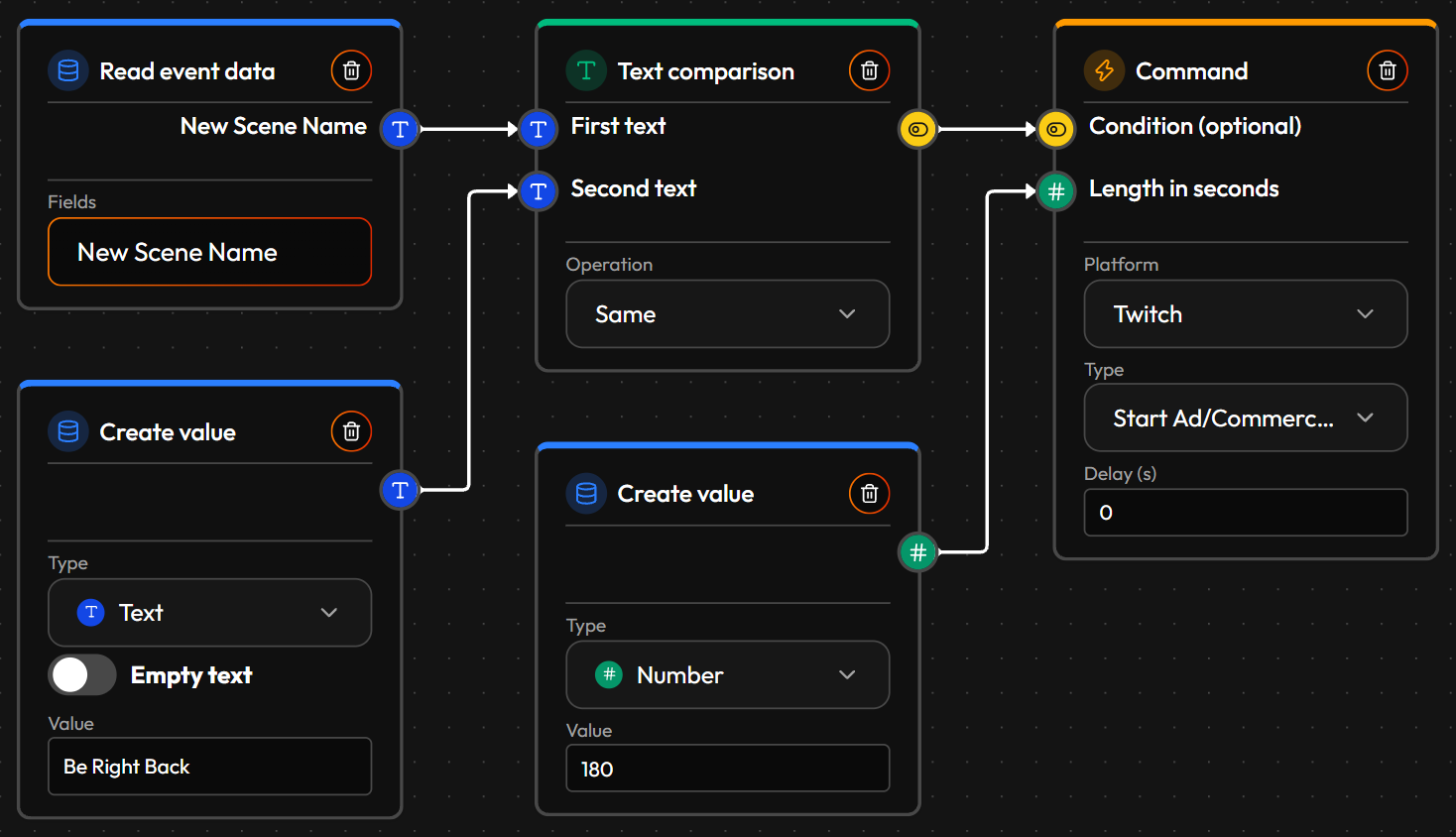
How it's built: the event is OBS Scene Switched. Read event data reads New Scene Name, and Text comparison (Operation: Same) compares it with "Be Right Back", your scene's name in a Create value node. The result goes into the Condition of Start Ad/Commercial, so the ad only runs for that one scene, not on every switch. Ad Duration (seconds) comes from a Create value node of type Number: 180 here, the longest single ad Twitch allows.
Good to know: Twitch only runs ads for Affiliates and Partners, and only while you're live. Start Ad/Commercial needs your own account as the Executor, not a bot account. For a friendly note in chat when the ad starts, add the ad break heads-up Flow too.
¶ 🎮 Your Twitch category and tags follow your game scene
Why people build it: when you play several games in one stream, it's easy to forget to change the Twitch category, and then the stream is listed under the wrong game where new viewers won't find it. With one scene per game in OBS, you switch scenes anyway, so the category and tags can follow along.
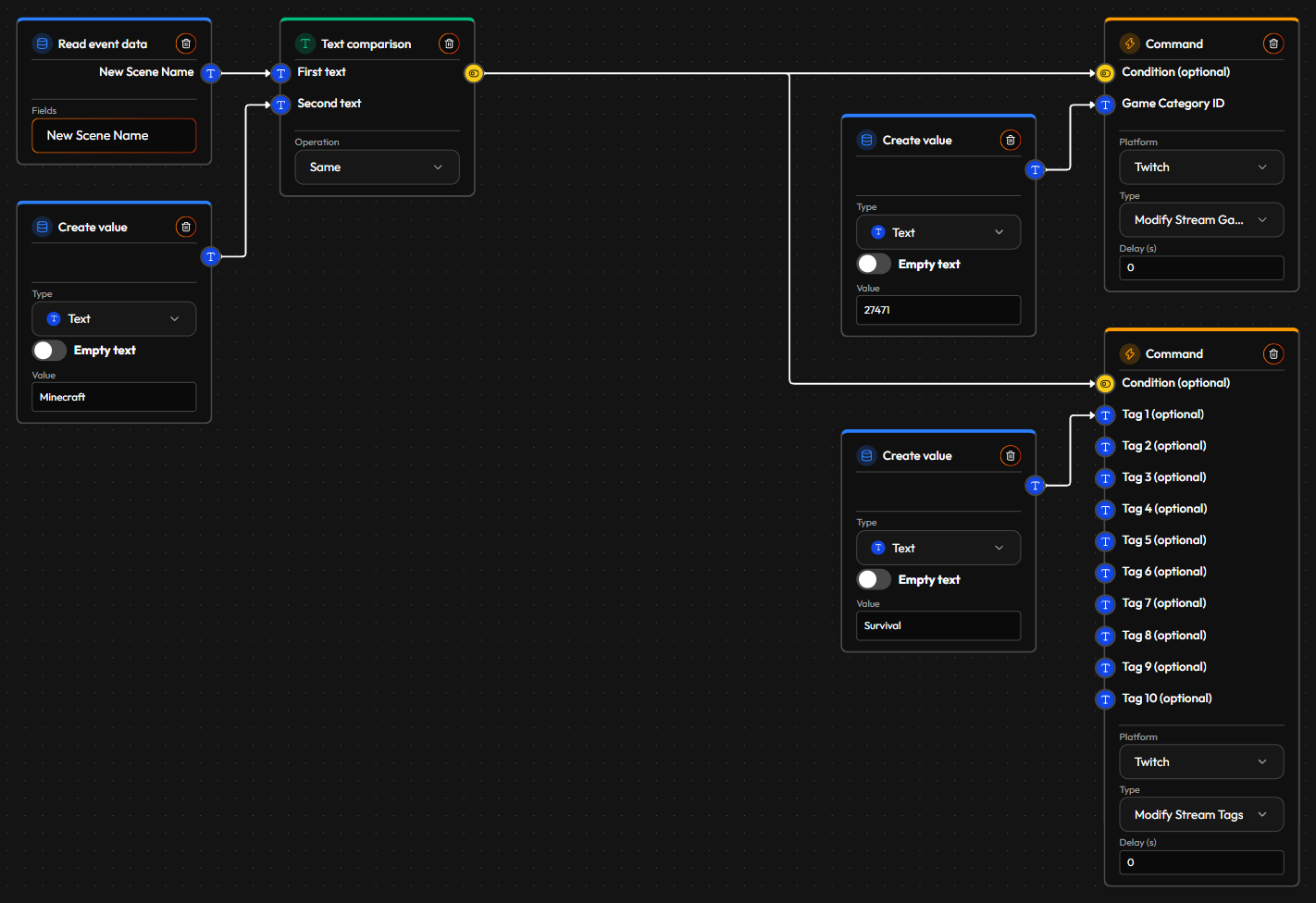
How it's built: the event is OBS Scene Switched. Just like above, Read event data (New Scene Name) and Text comparison (Same) check for your game's scene, "Minecraft" here. The result goes into the Condition of two Twitch Commands, so both only run for that scene. Modify Stream Game Category takes the game's Twitch category ID, a number Twitch gives every game (27471 is Minecraft), from a Create value node of type Text. Modify Stream Tags takes up to 10 tags, one Create value node each: "Survival" here.
One Flow per game: duplicate the Flow for every game scene and change the scene name, the category ID and the tags. A scene that isn't a game scene, like Be Right Back, matches none of them and changes nothing. Modify Stream Tags replaces all your current tags, so give each game the full set you want.
Finding a category ID: the easiest way is to ask Twitch while you're live with that category set: a small Flow on Twitch Chat Message (starts with "!gameid") with a Retrieve node (Get Own Stream, property Category Twitch ID) wired into Send Chat Message posts it in your chat.
¶ More ideas with OBS
-
🎚️ Mods turn your mic up or down from chat: fix "we can't hear you" in seconds, without you reaching for OBS.
Event: Twitch Chat Message, where Message Content starts with "!micup". Nodes: Retrieve (Get Source Information By Name, with your mic's name, property Volume (dB)) → Numeric arithmetic (+1), and Read event data (Is Moderator?) for the Condition. Action: Set Volume on your mic, with the new number, gated on the moderator check. Copy the Flow for "!micdown" (-1), and again for your game audio. Set Volume goes from -60 to 0 dB. -
⏸️ Pause the recording while you're away: a recording without the break in it, so there's less to cut later.
Event: OBS Scene Switched. Nodes: Read event data (New Scene Name) → Text comparison (Same, "Be Right Back"). Action: Pause Recording, gated on the check. In the same Flow, Not flips the check and And combines it with a Retrieve (Get OBS Status, property Is Recording Paused?); that goes into the Condition of Resume Recording, so switching to any other scene continues a paused recording. -
🎞️ A new recording file for every game: one video per game, ready to edit, instead of one long file.
Event: OBS Scene Switched. Nodes: Read event data (New Scene Name) → Text comparison (Same, your game's scene). Action: Stop Recording, and Start Recording with a few seconds in its Delay (s) so OBS has saved the old file first, both gated on the check. Copy the Flow for each game scene. Split Recording File does the same in one step without a gap, but OBS may need file splitting turned on in its recording settings for it. -
🐶 A channel point "pet cam": viewers spend points to see your pet for 30 seconds.
Event: Twitch Custom Channel Point Reward Redeemed, Reward Name equals "Pet cam". Action: Set Source Visibility on your pet cam (picked under Source in Scene) with Is Visible? on, and a second Set Source Visibility with Is Visible? off and 30 in its Delay (s). Both Is Visible? values come from Create value nodes of type Bool. -
📍 Mark great moments from chat: mods mark a highlight, so it's easy to find later, both in your recording and on Twitch.
Event: Twitch Chat Message, where Message Content starts with "!mark". Nodes: Read event data (Is Moderator?), wired into the Condition. Action: Add Recording Chapter (OBS, Hybrid MP4 recordings only) and Create Stream Marker (Twitch), both gated on the moderator check.
¶ 🔁 Cross-platform & scheduled
-
🔀 A rotating scheduled promo message: reminders that don't repeat the exact same line every time.
Event: Scheduled/Timer, e.g. hourly. Nodes: Random (1 to 3) → Switch (picks between three Create value nodes, each holding a different message). Action: Send Chat Message with whichever text got picked. -
🛡️ Mod action log in Discord: keep a record your team can see, even if they're not watching Twitch.
Event: Twitch User Banned. Action: Discord Send Channel Message, to a mods-only channel. -
👋 A stream-end sign-off on Discord: thank everyone and tell them when you're back, the moment the stream ends.
Event: Twitch Stream End. Action: Discord Send Channel Message, to your announcements channel. It pairs with the go-live post built out under Replace a bot. -
🌙 A "while you were offline" recap: when the stream starts, tell chat what happened since the last one, so nothing goes unnoticed — new followers, new subs and so on, even though you weren't live to see them.
Events: Twitch Follow and Twitch Subscription Paid, one Flow each. Nodes: Load value (that event's saved count) → Numeric arithmetic (+1) → Save value (the new count), every time the event fires. The count only grows, so it adds up while you're away. Event: Twitch Stream Start, in a separate Flow. Nodes: Load value (each saved count) → Number to text → Join text (builds the sentence). Action: Send Chat Message, e.g. "While you were away: +12 followers, +3 subs — welcome them!"
Start counting from zero at the right moment: add a third Flow on Twitch Stream End that saves 0 into every count. Counts then start fresh when a stream ends, so the recap at the next start covers exactly the time you were offline and not the stream before it. Each counter needs its own Save/Load Key (a plain typed-in name, like "followers-offline"), and the recap Flow reads the same names.
Only want to speak up when there's something to say? Add a Numeric comparison gate (total above a threshold) before Send Chat Message, so a quiet break doesn't produce "+0 followers". The same recap also works posted to a Discord channel instead of chat. -
🚨 Let your Discord mods know before your Twitch chat gets loud: only the bigger raids get escalated.
Event: Twitch Incoming Raid. Nodes: Numeric comparison (Viewer Count over a threshold you pick). Action: two at once, both gated on the check — a Twitch Command posting a shoutout in your own chat, and a Discord Send Channel Message to a mods-only channel.