Two small tools for one problem: not wanting to rebuild — or worse, individually re-edit — the same thing across a dozen Flows. Both live on the Automations page, in their own tabs next to Flows.
¶ 🔖 Constants — one value, everywhere
Picture this: your Discord invite link is baked into six different Flows — a chat command, a follow-welcome message, a raid shoutout. Your server resets and you get a new invite link. Now you're editing six Flows instead of one.
A Constant fixes that: set the value once, and every Flow referencing it picks up the change automatically. Click New constant and fill in:
- Name — whatever makes it recognizable later (e.g.
Discord Invite). - Type — Text, Number, Bool, or Datetime, the same four kinds used everywhere in the Flow Builder (see Flow Builder).
- Value — the actual value.
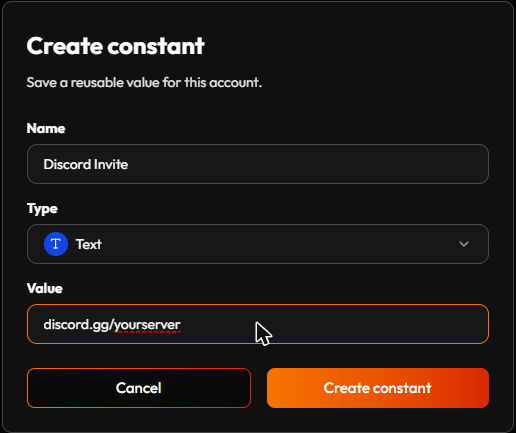
To use one, drop a Load value node in a Flow, set Source to Constant, and pick it from the list (see Nodes). Good candidates beyond invite links: a welcome message you tweak seasonally, a bits threshold that defines "big cheer" across several Flows, a cost you charge for the same redeem in more than one place — or, using a Bool this time, a Maintenance Mode switch you flip to true and wire (via Not) into every Command's Condition to pause a whole batch of Flows at once without unpublishing them one by one (see Flow ideas).
A Constant only changes when you edit it here — a Flow can't update it while running. For a number that needs to change itself (like a running counter), use Save value/Load value with Source: Variable instead.
¶ Using a Constant in the Flow Builder
A Constant reaches a Flow through a Load value node. New to placing and connecting nodes? Flow Builder covers that. For this node:
- In the node bar, open Data loaders and drag in Load value.
- Set Source to Constant.
- Under Constant, pick yours from the list. Each entry shows a small icon for its kind (text, number, and so on).
- Connect the node's output to whatever needs the value. Its connection point takes the kind of the Constant, so a text Constant gives a text output, ready for a message input.
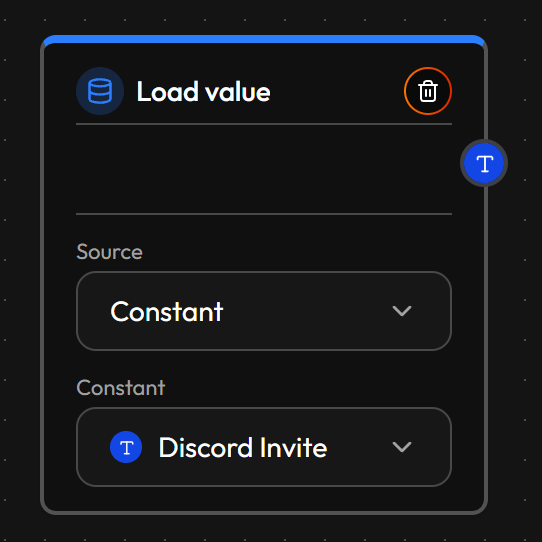
Change the Constant here on this page later, and every Flow using it picks up the new value. Every field of the node is described in the Nodes reference.
¶ 🧱 Macros — one chain of logic, everywhere
The same repetition problem, but for logic instead of values. Say you've built a "is this viewer a VIP?" check — a few nodes wired together — and you want the exact same check in three different Flows. Rebuilding it three times means fixing it three times the next time something's wrong with it.
A Macro is that chain, saved once. Click New macro and name it. Editing a Macro works exactly like editing a Flow: the same canvas, the same connections, the same shortcuts and the same hints when something needs fixing. Everything on the Flow Builder page applies. The only difference is which nodes you can use:
- Read event data is greyed out. A Macro isn't tied to any one triggering event, so there is no event to read from. Once a Macro is inserted into a Flow, its nodes are ordinary nodes there, so you can add a Read event data node next to them in that Flow.
- The Macro node isn't offered inside a Macro. Under the Other category you'll only find Comment, so a Macro can't contain another Macro.
- Everything else works as usual: the other Data loaders, all the Operations, the Actions and Comment.
Build the chain and save it (the Save button, or Ctrl+S). Then drop it into any Flow via Macro, found under the Other category in the node list, right next to Comment.
Copy and paste works across Macros and Flows. Select several nodes with Shift + click, copy them with Ctrl+C, and paste them with Ctrl+V on any canvas: from a Flow into a Macro, from a Macro into a Flow, or from one Flow into another. The connections between the copied nodes come along. A good way to start a Macro is to build the chain in a Flow first, then copy it over.
The copy-to-clipboard icon on a Macro in the Macros tab does exactly this for the whole Macro: it puts the Macro's nodes on your clipboard, ready to paste with Ctrl+V into any Flow or Macro, just like nodes you copied by hand.
Worth knowing: unlike a Constant, a Macro isn't a live link. Inserting one copies its nodes onto the canvas at that moment — editing the Macro afterward doesn't reach back into Flows it's already been dropped into. If it needs to change everywhere, update each Flow it's already in, or delete and re-drop the Macro fresh.
Good candidates: a viewer-tier check, a formatted-message builder, a cooldown check you want to behave identically everywhere it's used — see Flow ideas for a cooldown Macro worked out in full.
¶ Good habits
Give Constants a name that still makes sense later.
Discord Invitereads clearly in a Load value dropdown a month from now; "link 2" doesn't.
Reach for Save value/Load value with Source: Variable the moment a number needs to change itself. A Constant only ever changes when you edit it here — it's not built for a running counter.
Build the Macro once you're rebuilding a check for the third time, not the first. Two Flows sharing a chain might be a coincidence; three is a pattern worth saving.
¶ The short version
A Constant is one reusable value, kept live — edit it once and every Flow using it updates immediately. A Macro is a reusable chunk of logic you copy in, not a live link — fixing an already-inserted Macro means updating each Flow it was dropped into. Both still beat rebuilding from scratch: build it once, drop it in wherever you need it.