Every Collectable you have — the built-in Twitch ones tracking follows, subs, cheers, and raids automatically, or any custom one you've built and granted through a Flow — needs somewhere to actually watch the numbers move. That's the Dashboard. It's not a fixed template: you place widgets, resize them, style them, and arrange the whole page however suits you, and it updates in real time as grants, spends, and expirations happen. Think of it less as a report and more as a command center for your channel — a live instrument panel you can act from, not just watch.
¶ Building it
It starts empty. Click Edit Layout to switch the page into a grid, with a widget bar along the bottom.
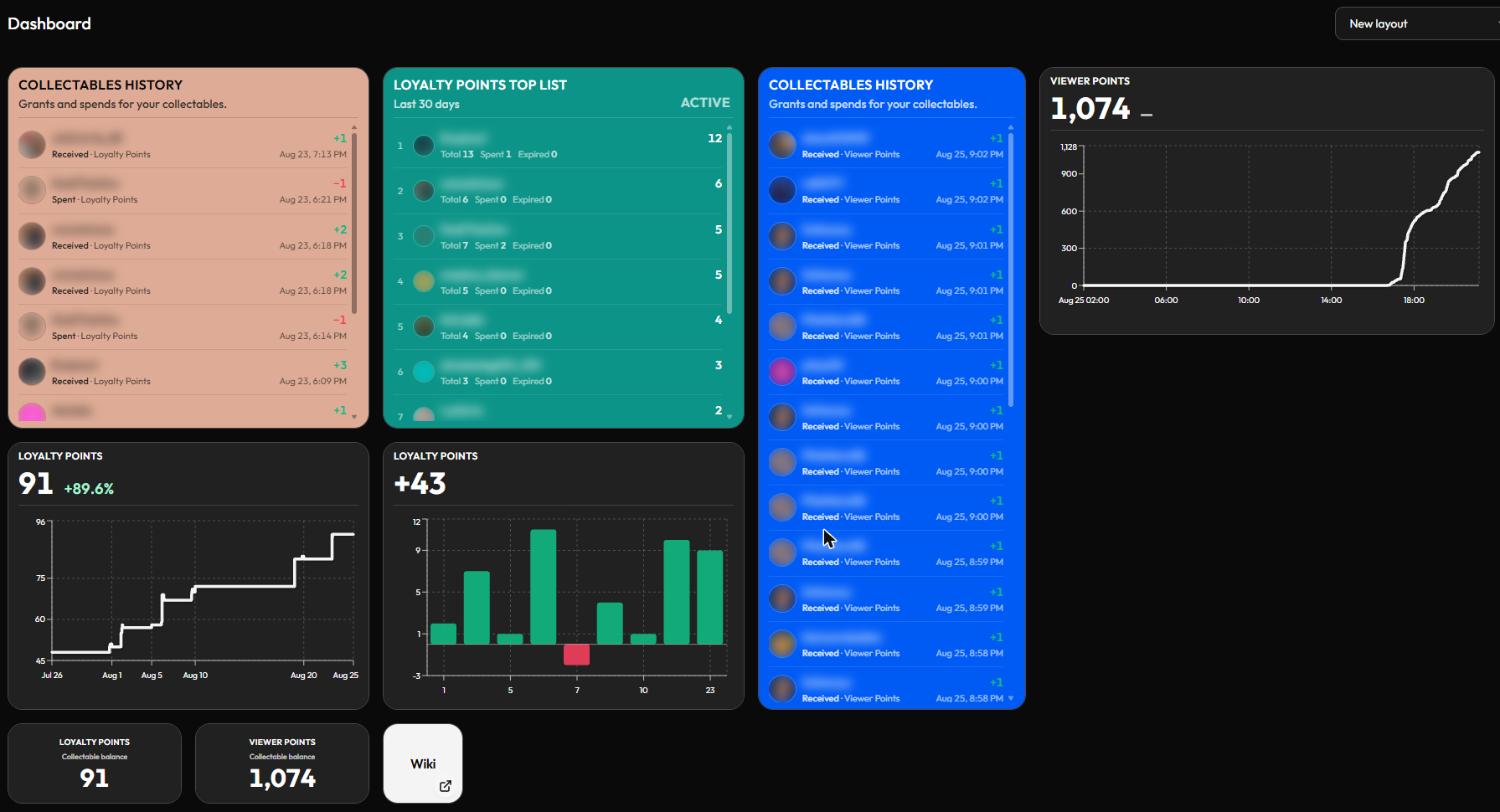
That's a real one, mid-stream — two completely different Collectables (Loyalty Points, Viewer Points) running side by side, each with its own history feed in its own color so you can tell them apart at a glance, next to a leaderboard and a couple of trend charts. Nothing about that layout is fixed, and none of it was fixed in place when it was first built, either:
- Drag a widget from the bar along the bottom onto the grid (or use its + button) to add it.
- Drag any tile, any time — new or already-placed — to rearrange the board. Nothing has to stay where you first dropped it.
- Resize by dragging a tile's corner, from a small square stat to a wide chart.
- Click any tile to open its settings panel on the right. Point it at any Collectable (or, for history, all of them at once), and — where it applies — filter which statuses show and pick an Order by. Give it its own background color, which is exactly how the two feeds above end up orange and blue instead of blending together.
Click Done when you're happy. Because every one of those is a per-tile choice, the same widget library can build a compact phone-sized glance-screen, a wide desktop analytics board, or a live event-tracking wall — it's the same handful of settings, just aimed differently each time.
¶ Layouts — more than one board
You're not stuck arranging one board and living with it. The dropdown at the top-right of the Dashboard (next to Edit Layout) switches between saved layouts — each a completely independent arrangement of widgets, sizes, and colors, and jump between them in one click.
That's what makes it worth building more than one specialized page instead of one crowded compromise: a compact overlay layout for a second monitor while you're live, a dense recap layout you check after you go offline, a stripped-down single-column layout for your phone. Click New Layout to start another one from scratch, give it a name via the pencil icon, and the trash icon removes whichever one is currently selected — your other saved layouts are untouched.
¶ What you can put on it
| Widget | Settings | Good for |
|---|---|---|
| Collectable balance | Which Collectable, background color | A single number — the current total balance for a Collectable across your whole audience (what's been granted, minus spent/expired) — e.g. how many Hype Points are out there right now. |
| Collectables history | Which Collectable(s) — or all of them at once — plus which statuses to show (Received / Spent / Expired) | A live log of grants, spends, and expirations, newest first, with who triggered each one — good for catching a redemption as it happens, not just after. |
| Collectable trend | Which Collectable, Period (e.g. this month), a Cumulative total toggle for line-vs-bar style, and (line mode only) Start Y axis at 0 | A line for balance over time — the shape of your economy, not just a snapshot. |
| Collectable top list | Which Collectable, Period, which statuses to rank by (Total / Active / Spent / Expired), Order by | A ranked leaderboard — each viewer's Active/Spent/Expired breakdown, not just a single number, genuinely fun to keep pinned during a stream. |
| Action button | A custom label plus a chosen action — currently Show toast or Go to Automations, with more planned | A quick shortcut into the builder, or a labeled reminder toast. |
| Shortcut | A label, a URL, and whether it opens in a new tab | A labeled link to anywhere you jump to often — the wiki, your Twitch dashboard, wherever. |
Collectables history is worth a second look once you set it to all collectables: at that point it's really a live feed of every grant, spend, and expiration across your whole economy, per viewer, as it happens — a direct replacement for Twitch's own streamer dashboard feed, and a more flexible one: it's not locked to Twitch's fixed set of event types, it tracks whatever Collectable you care about (built-in Twitch ones included), and you can run several history feeds side by side, one per Collectable, instead of a single mixed stream. If what you actually wanted was a general "what's happening in chat right now" activity feed, this covers that without needing a separate widget or a third-party overlay for it — it's already there, already real-time, and already tied to whatever your Flows are doing.
¶ A few ways people actually use this
Because it's real-time, resizable, and layout-flexible, the Dashboard ends up filling a few very different roles depending on how you build it:
- A live overlay panel while you stream. A compact, narrow arrangement — a couple of balance tiles and a top list — kept open on a second monitor or a phone propped by your keyboard, standing in for the Twitch Creator Dashboard's "what's happening right now" view, except built around whatever Collectable you care about — the built-in Twitch ones or your own custom points.
- A post-stream recap. After you go offline, the same page answers "what actually happened tonight?" — who topped the leaderboard, whether a new redeem got used at all, whether last week's "double points" push moved the trend line, and now, whether a batch of points expired before anyone spent them.
- A mobile companion. Stay within a narrow widget width and the whole layout works as a phone-friendly glance-screen; go wide instead and it becomes a proper full desktop dashboard with room for trend charts and history side by side. Save both as separate Layouts and switch between them instead of picking one shape forever.
- A personal launcher. A row of Shortcut tiles to the pages you open constantly mid-stream — turns the Dashboard into a small home base, not just a stats screen.
- A view for your team, not just you. Invite someone through Shared Access and, once they've switched into your account, they see this same live Dashboard — an Analyst delegate can watch the same balances and trends without ever touching a Flow, so a co-mod running chat doesn't need edit access just to see what's going on.
- A drop-in replacement for a Twitch activity feed. Instead of embedding a separate "recent activity" widget from another tool, a full-width Collectables history tile set to all Collectables gives you the same real-time sense of what's happening in chat — except it's grants, spends, and expirations from your own economy, not a generic feed.
- A raffle or watch-party night board. Build a one-off Layout around a single Collectable for a special event — a top list to show who's winning and a history feed so entries feel visibly live — then switch back to your regular Layout once the event's over instead of tearing down your normal setup.
Nothing plotted yet? Every widget here reads from a Collectable — the built-in Twitch ones (follows, subs, cheers, raids) already track themselves with zero setup, so point a widget at one of those to get started right away. Want to track something custom instead? Build your own Collectable and grant it through a Flow.
¶ Good habits
Build more than one Layout instead of one crowded page. A compact overlay for a second monitor, a denser recap for after the stream, a single-column one for your phone — switching between saved Layouts is easier than fighting one layout to do everything at once.
Give side-by-side tiles their own background color. Once you're running more than one Collectable at a glance — like two history feeds — a color per tile is the difference between reading it instantly and squinting to work out which number belongs to which feed.
Point one Collectables history tile at every Collectable for a real-time activity feed. It's the fastest way to replace a generic "what's happening in chat right now" overlay — grants, spends, and expirations from your own economy, as they happen.
Name your Layouts with the pencil icon. It takes two seconds and saves you from guessing which one is which once you've got three or four saved.
Check what a delegate actually sees. If you've invited someone through Shared Access, have them switch into your account once and confirm the Dashboard shows what you expect — an Analyst can watch balances and trends without needing edit access to anything else.