This page is about the Flow Library: sharing Flows you built, and starting from Flows other streamers built.
Somebody has probably already built the Flow you are about to start. A raid welcome, a !followage command, a Discord invite that pops up in chat every half hour: these are things almost every channel wants, and there is no reason for everyone to wire them up from scratch. The Flow Library is where streamers share their Flows with each other, for streamers by streamers. You take a copy, fill in your own details, and publish it. And when you build something you are proud of, you can share it back.
Everything here is about copies. Using a shared Flow gives you your own copy, and sharing a Flow gives others a copy of yours. Nobody ever gets access to your accounts, your channels or your Flows themselves.
¶ Two ways to share
Every shared Flow gets its own link, and you decide who can find it:
- 🔗 Private: only people you send the link to. Handy for sending a Flow to a friend, your moderator, or a streamer who asked "how did you do that?". It never shows up in the Library.
- 🌍 Public: listed in the Flow Library for everyone, once the StreamWizard team has checked it (see Waiting for a check). The link works right away.
You can switch between the two at any time, except that a curated Flow stays public.
¶ Curated and community Flows
Public Flows come in two kinds, and it's worth knowing which one you're looking at:
- ✅ Curated: checked and picked by the StreamWizard team, with a Curated badge. Someone on the team looked at what the Flow does, how it's built, and whether its name, summary and description explain it well. Curated is kept small on purpose: a set of finished, well-built Flows that together cover what most channels need, without five versions of the same thing. When you just want something that works, start here.
- 🌱 Community: every other public Flow, shared by streamers like you. The team takes a quick look at each one before it shows up in the Library, to keep out spam and anything that breaks the Community Guidelines, but nobody tests them. There are a lot more of them: that's where you find the unusual ideas, the niche ones and the brand new ones. They can be great, but read the description and try them out before you rely on one.
The Library opens on Curated. Switch to All to see both kinds together.
A Flow doesn't stay community forever if it's good: whoever shared it can ask the team to curate it (see Getting your Flow curated). And curated Flows stay checked: when their author changes one, the team approves the update before anyone else gets it.
¶ Finding a Flow in the Library
Open Flow Library in the left menu. It has two tabs: Library (everyone's public Flows) and My shared flows (yours, more on that below).
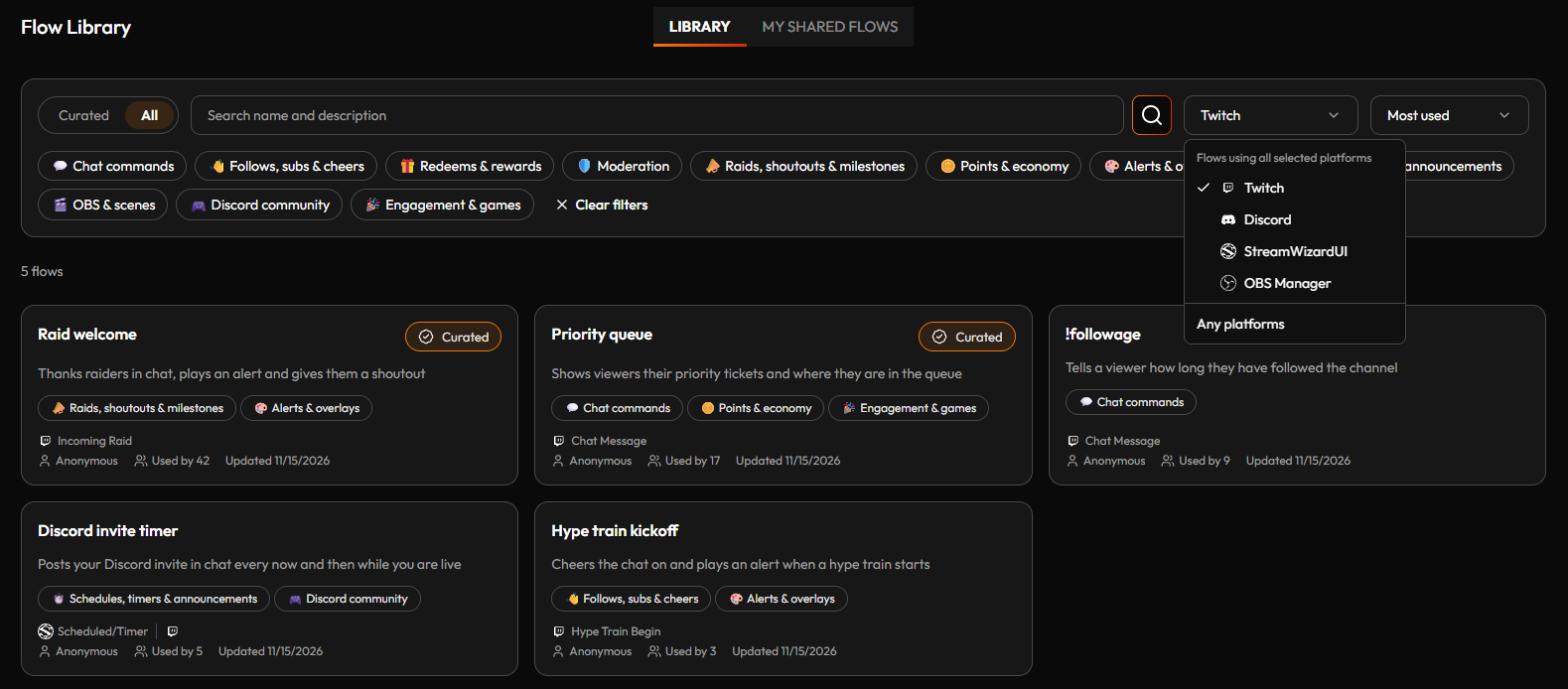
Curated and All at the top left switch between the curated Flows and every public Flow (see above). To narrow it down further:
- Search looks through the name, the summary and the description.
- Platforms shows Flows that use all the platforms you pick, for example only Flows that use both Twitch and Discord. "Use" counts every platform in the Flow: the one its event comes from, the ones its Commands and Retrieves talk to, and the ones of the Collectables it uses. Any platforms clears the pick.
- Categories (Chat commands, Raids, shoutouts & milestones, Points & economy, and so on) show Flows in any of the categories you pick.
- Most used or Newest sorts the list.
Clear filters resets the search, platforms and categories. The Library remembers your filters, so when you come back later, you land where you left off.
Each card shows what the Flow does in one line, its categories, the event that starts it (with the platform's icon), and the icons of any other platforms it uses. Below that you see who shared it (or "Anonymous"), how many accounts use it, and when it was last updated.
¶ What a Flow's page tells you
Click a card, or open a shared link, to see the Flow's page.
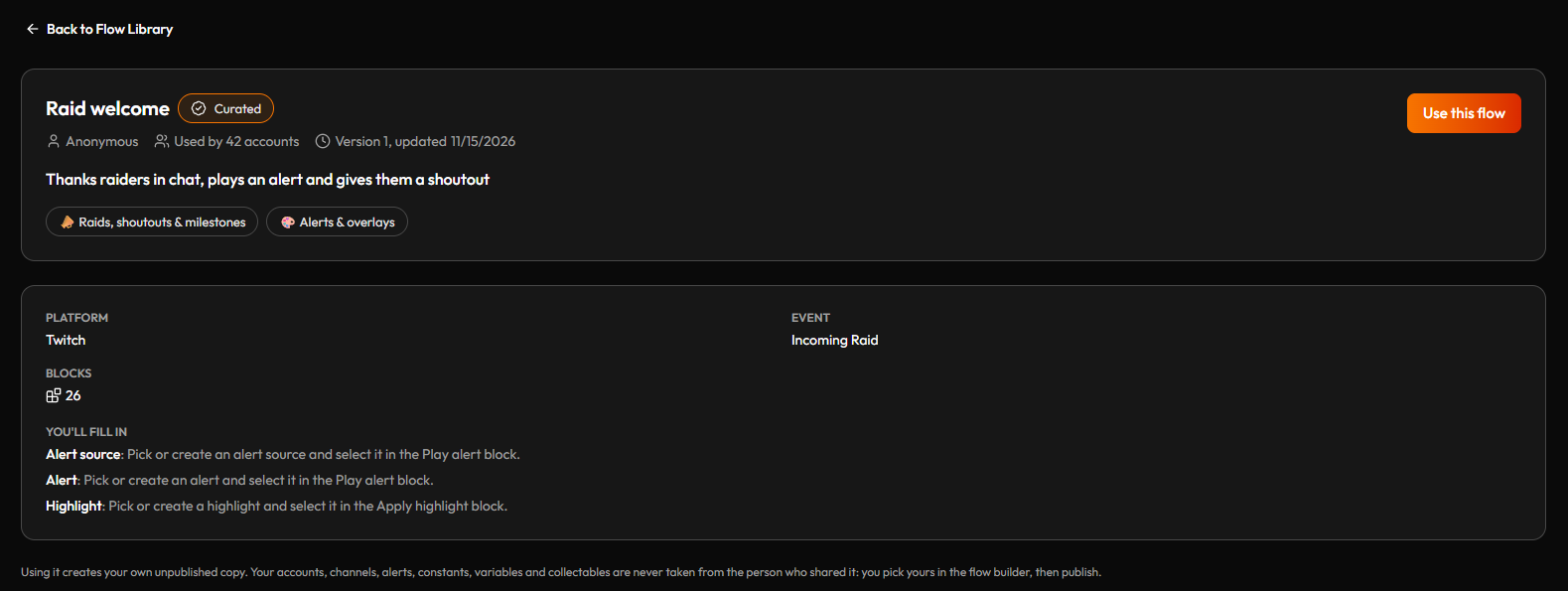
The most useful part is You'll fill in. When a Flow is shared, everything that belongs to the person who built it is left out: their alerts, their channels, their Collectables, their Constants and the values in them. That way nothing personal ever leaves their account, and it also means you get to pick your own. "You'll fill in" lists exactly what that is, and in which block. Sometimes it also says what the author used, for example The author used "Priority Requests", so you know what kind of Collectable to pick or create.
The page also shows the platform and event, the trigger (for chat commands), how many blocks the Flow has, and, if it uses more than one platform, all of them under Uses. On a Flow that isn't curated, a line reminds you that another streamer made it and StreamWizard didn't test it.
¶ Using a Flow
Click Use this flow, pick one of your Folders, and give your copy a name (it starts with the shared Flow's name). Create flow makes your own unpublished copy and opens it in the Flow Builder. From there:
- Fill in what the page listed: pick your alert, your channel, your Collectable, and so on. The Flow Builder marks every block that still needs something.
- Change anything else you like. It is your copy now.
- Publish it on the Automations page, like any other Flow.
The account that performs each Command is picked for you: the only one that can do it, or otherwise the StreamWizard account. You can change it in the Command block if you want a different one.
Before the copy is made, StreamWizard may stop you with one or two things to know:
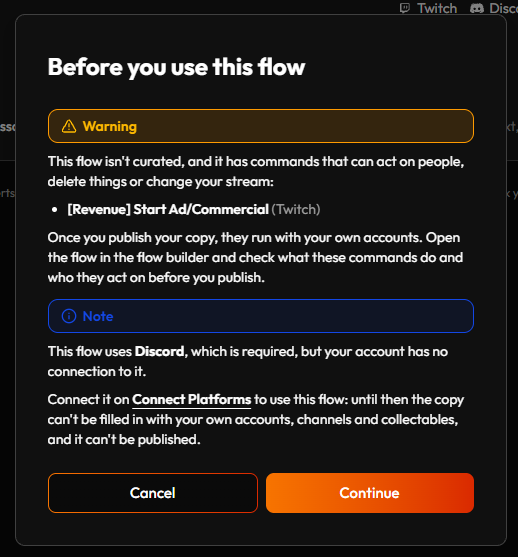
- ⚠️ Warning: the Flow isn't curated and has commands that can act on people, delete things or change your stream, like banning or timing out viewers, giving out roles or VIP, deleting messages or channels, starting an ad or a raid, or ending the stream. The window lists them. They do exactly what the Flow tells them, with your own accounts, once you publish your copy, so open the Flow in the Flow Builder and check what these commands do and who they act on before you publish. Curated Flows don't get this warning: the team already looked at them closely.
- ℹ️ Note: the Flow uses a platform your account isn't connected to. Without that connection you can't pick your own channels or accounts on it in the copy, and you can't publish it. Connect it on Connect Platforms first (see Account).
Cancel leaves everything as it was. Continue makes the copy anyway, for example if you want to look around in it before connecting.
A few more things worth knowing:
- Using a Flow needs an active plan. Without one you can still browse the Library and open Flows, but Use this flow is disabled.
- If you already made a copy before, the page says so ("You already use this flow in ...") with a link to your copy. Using it again makes another copy.
- Your copy is yours. If the author updates their shared Flow later, your copy stays exactly as it is.
¶ Sharing your own Flow
On the Automations page, open a Flow's settings (the gear icon on its card) and click Share.
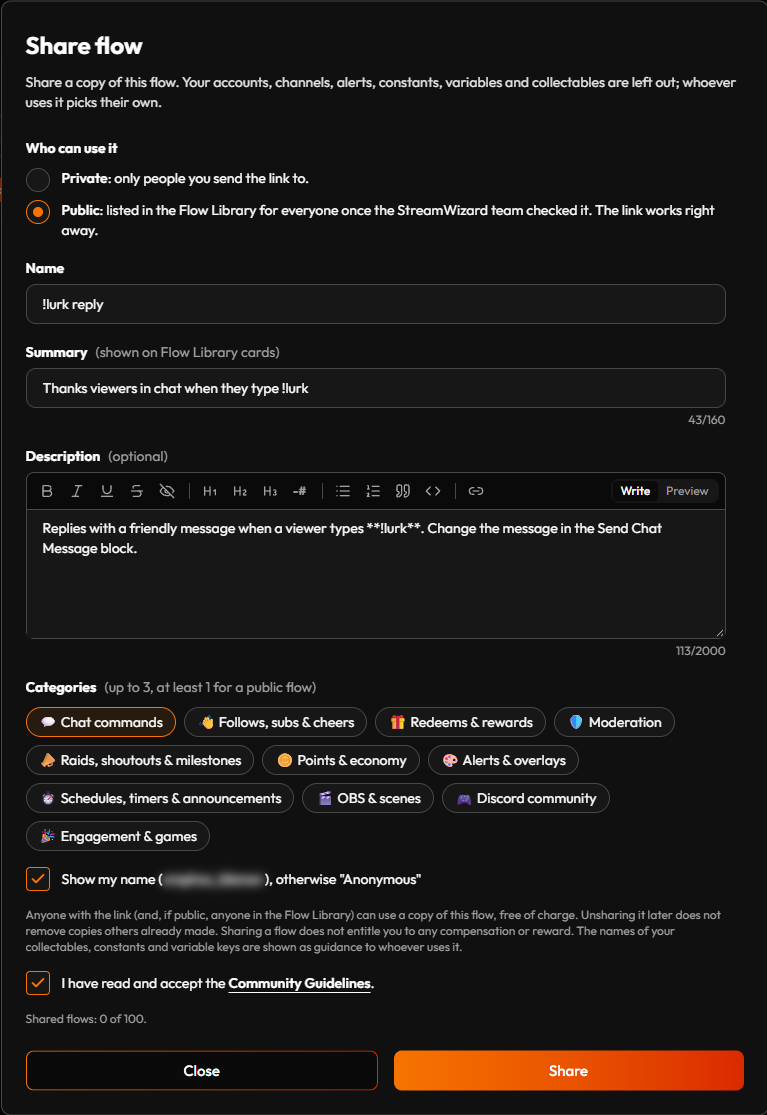
- Who can use it: Private or Public (see above). New shares start as Private.
- Name: what others see. It doesn't have to match your Flow's own name, and it becomes the name of the copies people make.
- Summary: one line on what it does. This is what the Library cards show, so make it count.
- Description (optional): everything else, like how to set it up and what someone needs for it. It supports simple formatting, with buttons above the text box: bold, italic, underline, strikethrough, spoilers, headings, small text, lists, quotes and code. Preview shows how it will look. Web links aren't allowed, but you can link another shared Flow with the link button, for example when your Flow works together with another one you shared.
- Categories: up to three, so people find it. A public Flow needs at least one.
- Show my name: shows your name as the author, otherwise "Anonymous".
The first time you share, tick I have read and accept the Community Guidelines. The Community Guidelines say what you may share and what happens when a Flow breaks them. You only accept them once per account (and again when a new version comes out); later shares show a short reminder with the link instead of the box. If you work on someone else's account as a Delegate, your tick counts for that account.
Under the form, a short note sums up what sharing means: anyone with the link (and, if public, anyone in the Library) can use a copy, free of charge. Unsharing later doesn't remove the copies people already made. Sharing doesn't entitle you to any payment or reward. And the names of your Collectables, Constants and variable keys are shown as hints to whoever uses it (their values never are), because they help people pick the right ones.
Click Share, and you get the link with a Copy button. Open Share on that Flow again whenever you need the link.
¶ Waiting for a check
A public Flow doesn't show up in the Library straight away: first someone on the StreamWizard team takes a quick look at it against the Community Guidelines. Until then its status is Waiting for a check, and its link already works, so you can send it around in the meantime (for example in the StreamWizard Discord). This is only a basic check against spam and rule-breaking Flows, not a test and not curation. Making a private Flow public counts as a new public share and waits for a check again.
¶ Keeping it up to date
The shared Flow is a snapshot. When you improve your own Flow, the shared one doesn't change by itself. Open Share again (or Manage on My shared flows) and use:
- Update from flow: shares your Flow as it is saved right now, as a new version. A public community Flow that's already in the Library stays there; the team takes another look at the new version later.
- Edit details: changes the name, summary, description, categories, Private or Public, and whether your name is shown. A new name, summary or description is a new version too: a listed community Flow stays in the Library, and the team looks at it again later. Changing only the categories or whether your name is shown doesn't count.
- Unshare (click it twice to confirm): the link stops working and the Flow leaves the Library. Copies people already made keep working, since they are their own Flows. Curated Flows can't be unshared or made private, because other streamers rely on them (see the Community Guidelines).
Your plan sets how many Flows you can share at a time. The Share window shows how many you've used. On top of that, you can share up to 100 new Flows a day.
¶ Getting your Flow curated
A public Flow starts as a Community Flow, under All. If you think it is good enough to be one of the picked ones, click Request curation in its Share window. The StreamWizard team looks at what it does, its name, summary and description. The bar is high on purpose: Curated is meant to be a small set of finished, well-built Flows, so unfinished Flows and ones that do the same thing as an existing curated Flow get declined. Reviews are done by hand and can take a few days. You can withdraw your request while it's open.
You get a notification either way. If it's approved, your Flow gets the Curated badge and shows under Curated. If it's declined, the reason is on My shared flows, and you can improve the Flow and ask again any time.
Once a Flow is curated, your updates to it wait for the team's approval before others get them. Until then, the version they approved stays the one people see and use.
¶ My shared flows
The My shared flows tab lists every Flow you shared, private and public, with a Copy link, Open page and Manage button on each.
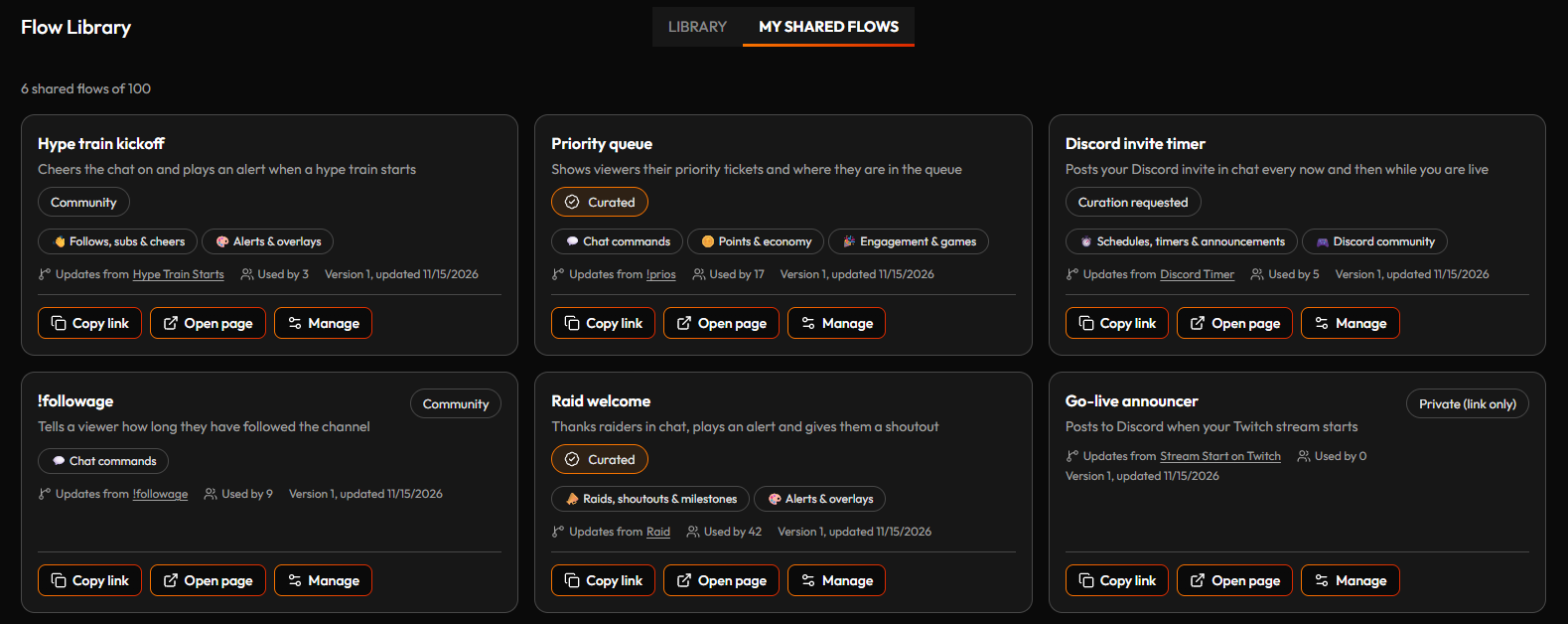
Each card also shows which of your Flows it updates from, how many accounts use it, and its status:
| Status | What it means |
|---|---|
| Private (link only) | Only reachable through its link. |
| Waiting for a check | Public, but not in the Library yet: the team checks it first. The link already works. |
| Community | Public, listed under All. |
| Curation requested | You asked for curation; the team hasn't decided yet. If the team hasn't checked the Flow yet either, it stays out of the Library until then, and the card says so. |
| Curated | Picked by the team, listed under Curated. |
| Update pending review | A curated Flow with an update waiting for the team. The approved version stays live meanwhile. |
| Curation rejected / Curation removed | Still a community Flow. The team's note says why, and you can request curation again. |
| Removed by an admin | Taken out of the Library by the team, with their note. Its link no longer works, and that Flow can only be shared privately from then on. |
If you think a decision about your Flow was wrong, the Community Guidelines say how to ask for a review.
If you delete the Flow a share was made from, the share keeps working and its card says Source flow deleted. To update it again, open its page and use Use this flow: your new copy becomes the Flow the share updates from.
If you work on someone else's account as a Delegate, you share their Flows under their name: the author shown is always the account owner, never you. What you can share depends on your role there: a Supermod shares privately by link, Full access also publicly, a Moderator or Analyst can't share (see Shared Access).
¶ Good habits
- Write the summary for a stranger. One clear line about what happens, like "Thanks raiders in chat and gives them a shoutout", tells people more than a clever name.
- Say what's needed in the description. "You need a Collectable for the tickets and an alert for the sound" saves the next streamer a lot of guessing.
- Test before you share. Share a Flow you have published and seen working on your own channel.
- Read the Community Guidelines once. They're short, and they're what the team checks public Flows against.
- Try a Flow before you rely on it. After using a shared Flow, fill it in, publish it, and trigger the event yourself once, like with any Flow you build (see Flows).
- Share privately first. Send the link to a friend and let them try it, then switch it to Public.
¶ Word list
| Word | What it means |
|---|---|
| Flow Library | The place in StreamWizard where streamers share Flows and use each other's. |
| Shared Flow | A copy of a Flow someone shared, with its own link. |
| Private / Public | Who can find a shared Flow: only people with the link, or everyone in the Library too. |
| Community | A public shared Flow that isn't curated (yet). |
| Waiting for a check | A public shared Flow the team hasn't looked at yet. It isn't in the Library, but its link works. |
| Community Guidelines | The rules for sharing Flows, accepted the first time you share. |
| Curated | A public shared Flow the StreamWizard team checked and picked. |
| Use this flow | Making your own copy of a shared Flow in one of your Folders. |
| You'll fill in | The list of things you pick yourself in your copy, because they belong to whoever shared it. |
| Update from flow | Sharing the current saved state of your Flow as a new version of its shared Flow. |